
Hello there, geography teachers!
I hope you are all having a great start to the school year. Today I am excited to share my next AP Human Geography activity: the Population Pyramid Lab.
This activity has students explore population pyramids, interact with them, analyze demographic patterns, and answer questions that connect the pyramids to concepts throughout Unit 2 of AP Human Geography.
This time I also created a teacher section that includes:
- Common misconceptions for each investigation
- Teaching tips
- A more comprehensive answer key
- Extra discussion questions you can use with your students
Before you jump into the activity, I want to walk you through a few things so everything makes sense and you can have a smooth day in class.
What is the activity?
This activity consists of 12 different investigations. Each investigation includes:
- 2 population pyramids
- 4 questions
- Additional demographic data when needed
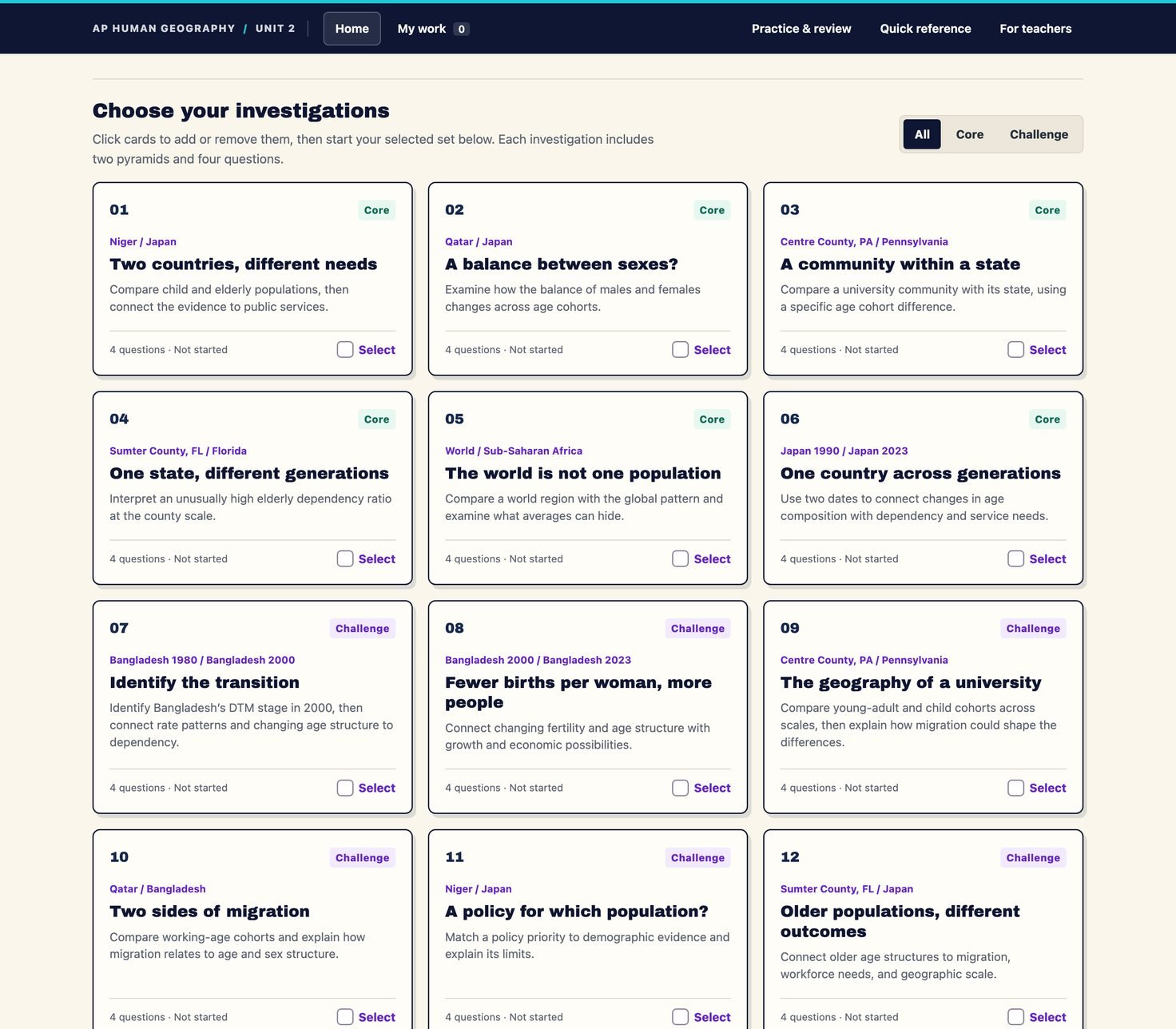
Some investigations use population pyramids at different geographic scales to help students practice scale of analysis, while others compare countries from different parts of the world.
Many of the investigations also include extra information to help students answer the questions and better understand what is happening in each population. Below the pyramids, students may find data such as:
- Sex ratio
- Child dependency ratio
- Elderly dependency ratio
- Birth rates and death rates
- Other demographic information connected to AP Human Geography concepts
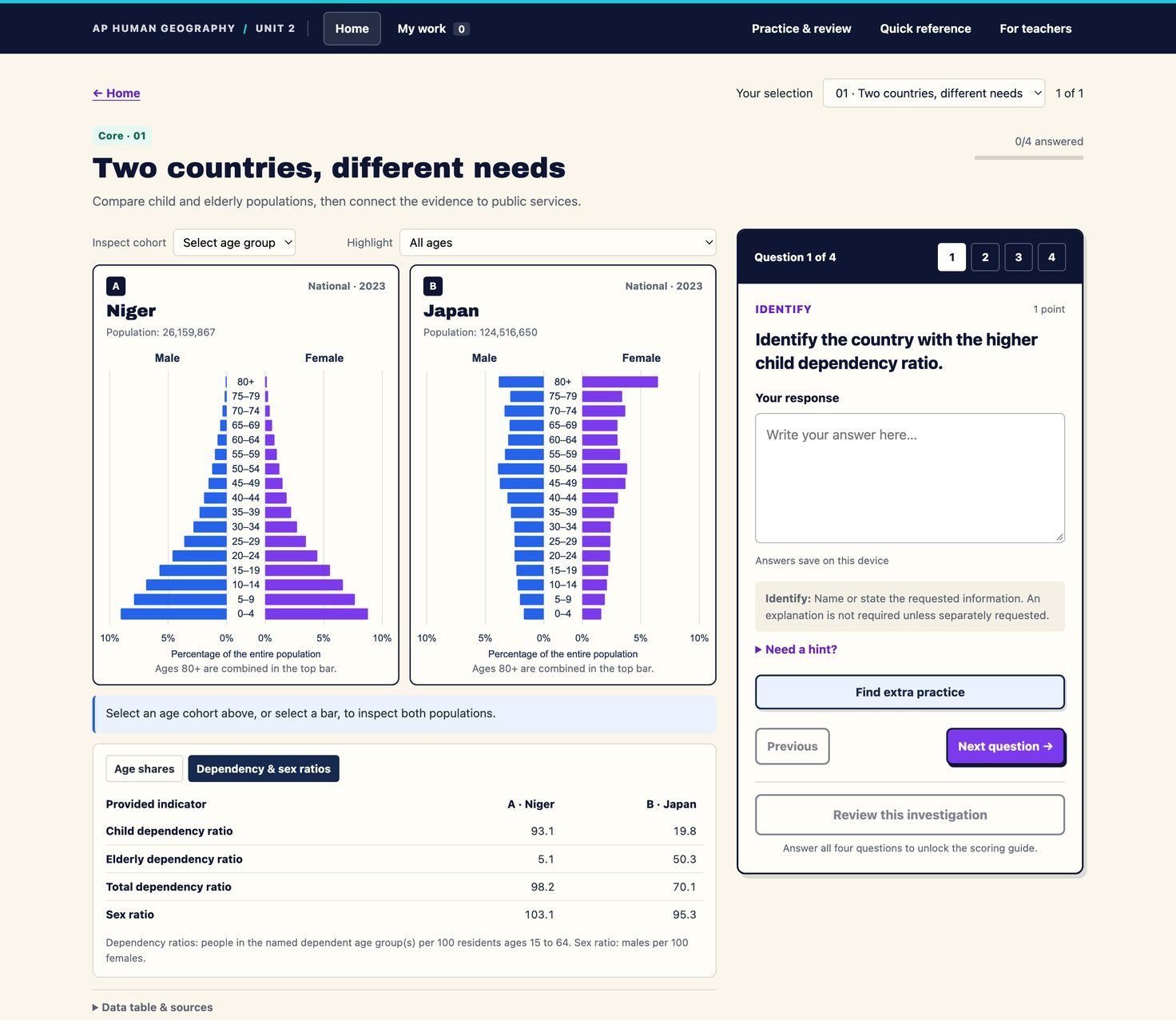
The goal is to help students move beyond simply looking at the shape of a population pyramid and instead understand the larger demographic picture of the places they are analyzing.
The main focus of the assignment is the questions that come with each investigation. The four questions focus on different parts of the population pyramids. You will notice that many of the investigations are also built around specific course concepts. The goal is to get students practicing different skills while reviewing and applying vocabulary from Unit 2.
One quick note: student answers are saved locally on the device they are using. If students switch devices, their previous answers will not transfer.
Creating custom assignments for your class
As a teacher, you can pre-select which investigations you want your students to complete.
To create a custom assignment:
- Click For teachers in the top-right corner of the page.
- Click Assign.
- Select the investigations you want your students to complete.
- Click Copy assignment link.
- Share that link with your students.
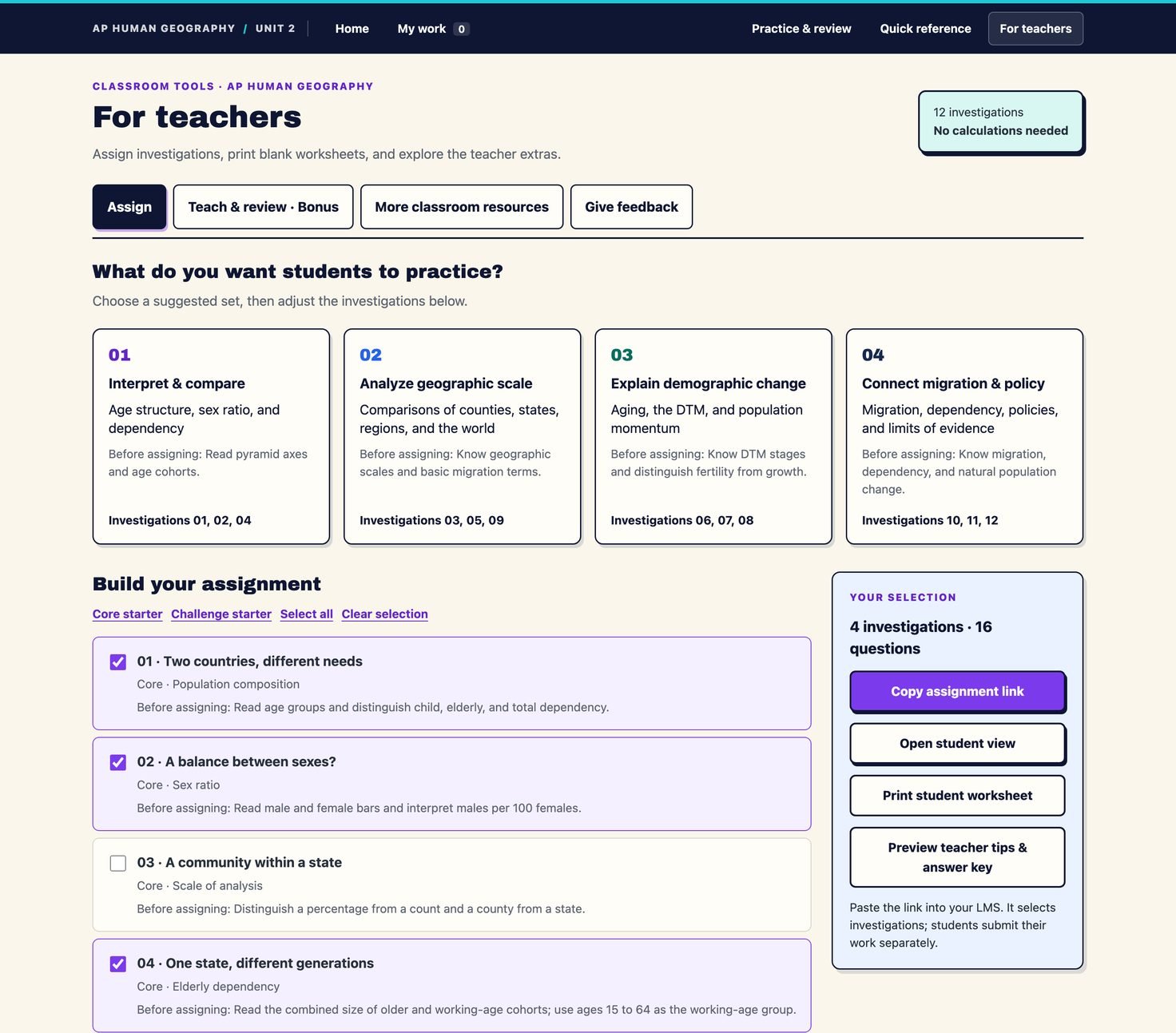
Students can then open the link and start working on the investigations you selected.
You can also click Print student worksheet to create a printable worksheet version of the assignment for your class.
If you decide to print the questions, just keep in mind that students will not be able to use the self-grading answer key or interact with the population pyramids the same way they can in the digital activity.
Teacher prep, answers, and tips
One part of this activity that is new for these digital activities is the teacher support section. It includes teaching tips, common misconceptions, extra discussion questions, and a detailed answer key.
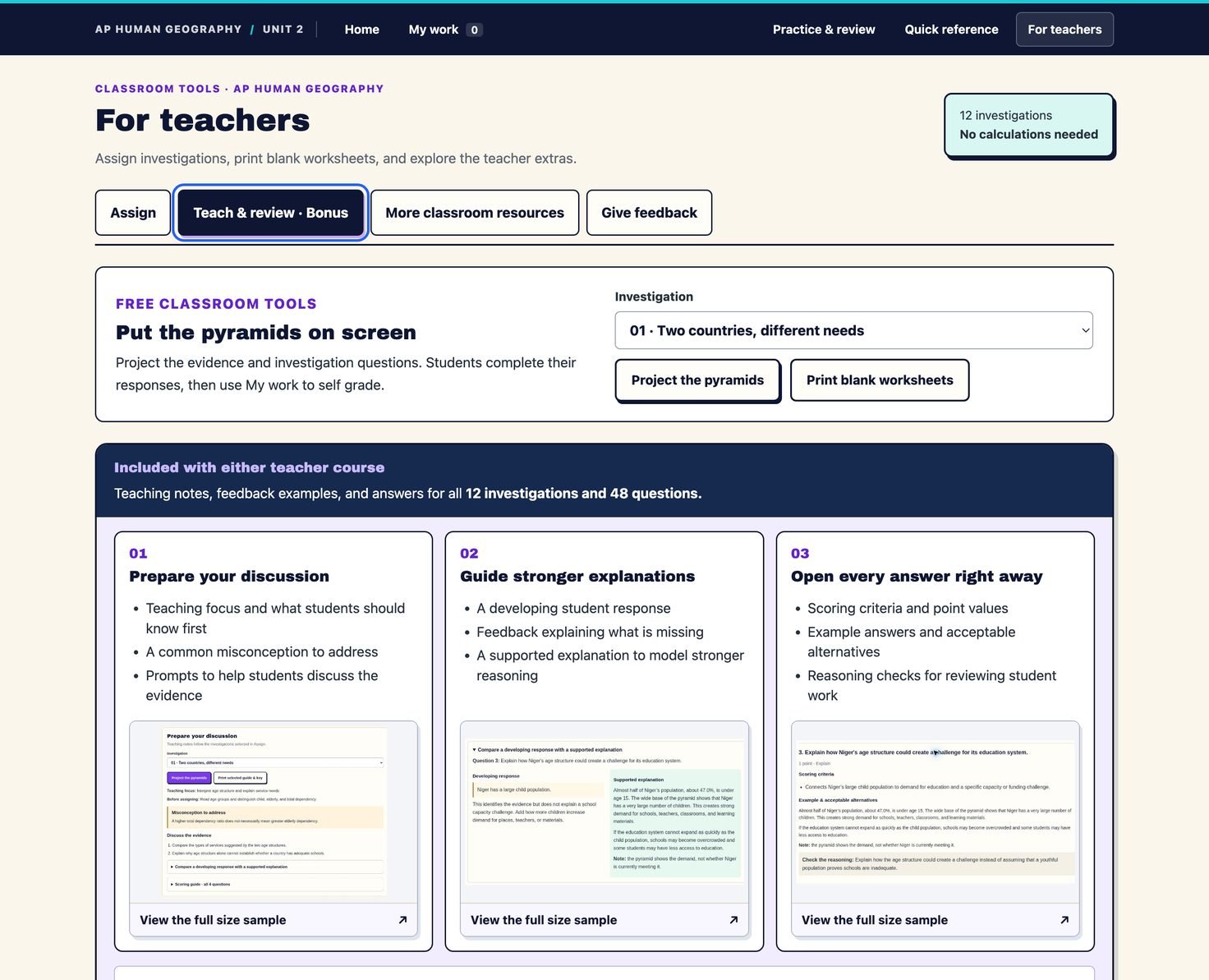
These resources are designed to help teachers better understand the investigations and provide stronger feedback to students.
Now, while I love this section, it also presented me with a problem. The challenge I faced was figuring out how to give teachers all of this information without also giving students access to every answer before they completed the activity, which would defeat the purpose of the activity.
The solution I came up with was to place the teacher resources inside my AP Human Geography Lessons & Slides and Teacher Worksheets & Activities, which are both teacher-only resources.
This way, everyone can use the Population Pyramid Lab for free, while teachers still have access to additional support and students cannot simply look through the complete answer key before answering the questions.
If you do not have either of these resources, no worries. You can still use the activity and have students grade their answers. They just have to answer the questions first, then click Review answers.
Grading
Speaking of students grading their work! Remember, just like the first activity, students can check their work and grade their answers as they move through the activity.
Students have two options:
- Complete all of the assigned investigations first and review their answers at the end.
- Review their answers after completing each individual investigation.
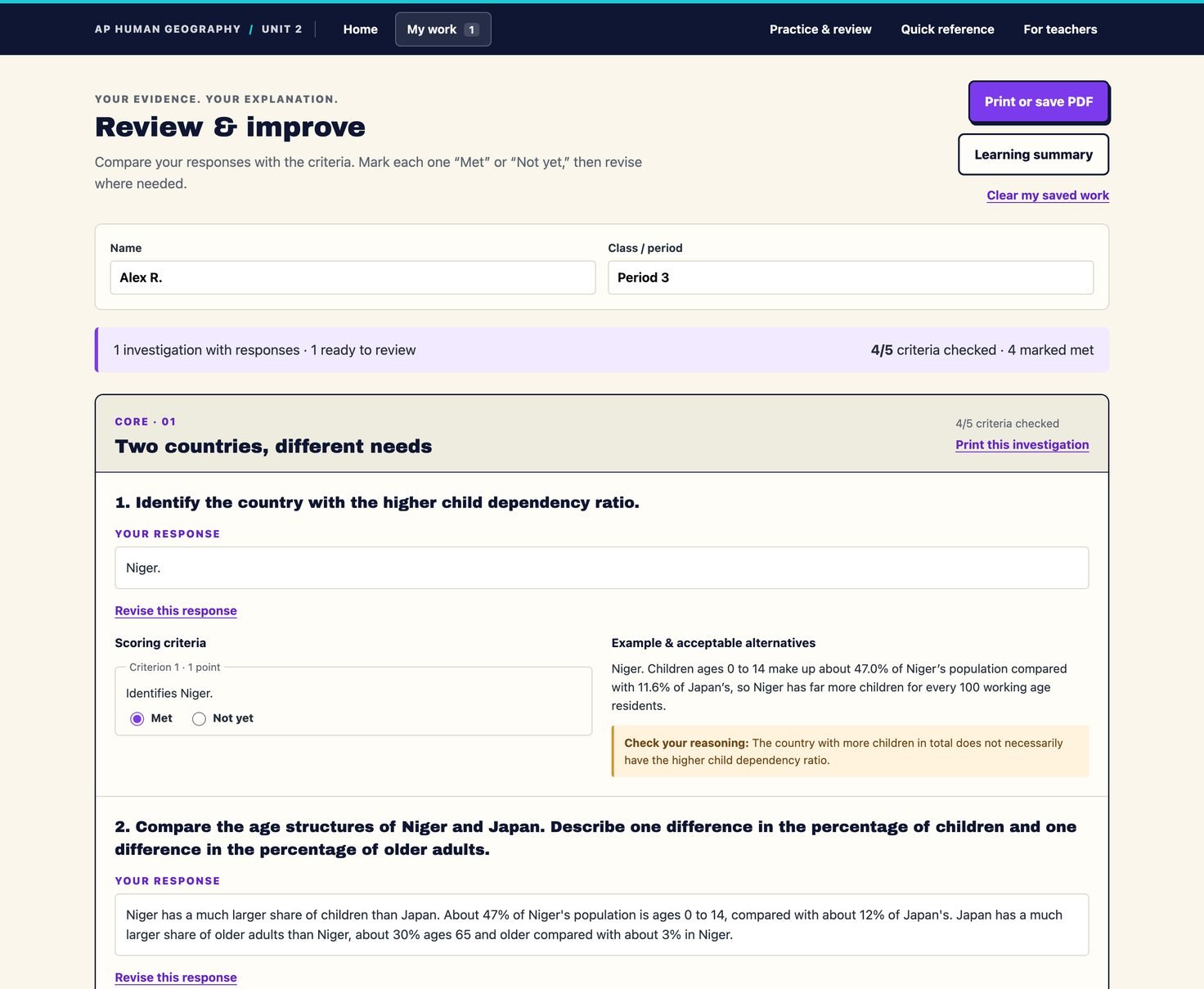
If students want to review their answers as they go through the activity, they must attempt all four questions in an investigation before the answer key unlocks. If they have not answered all four questions, they will not be able to review the answers.
This helps prevent students from immediately opening the answer key without first attempting the questions.
Once students grade their work, they can save their results as a PDF or print them, making it easy to turn in their work or show you that they completed the assigned investigations.
How I would use this in my classroom
When teaching population pyramids, I normally start with a lecture where I explain how to read a population pyramid, what the different parts show, and how we can use population pyramids to understand the past, present, and future.
I also like to practice interpreting a few population pyramids together as a class before having students work independently. This helps make sure students understand how to interpret the pyramids, and gets them used to looking for themes and trends.
Sometimes I will flip the classroom and have students watch a review video covering the basics of population pyramids before class. That way, I can start class with a quick review and move into practice much faster.
After reviewing population pyramids as a class, I would shift into the Population Pyramid Lab.
I personally like having students work in pairs. This gives students someone to bounce ideas off of, discuss patterns with, and support if they get stuck.
You could absolutely have students work individually or in larger groups. However, I often find that if groups get too large, students are more likely to get distracted and fewer students end up doing the actual work.
Once students start working, I like to walk around the room and check in with different groups. Generally, I try to:
- Help groups that are struggling
- Ask follow-up questions instead of immediately giving answers
- Push students to explain what they are seeing in the pyramids
- Give extra discussion questions to groups that are moving quickly
My goal is to make sure every student is learning and getting the support they need.
Another option is to have the entire class move through the investigations together.
For example, you could give students 10 minutes to complete Investigation 1. Once the time is up, bring the class back together and review the investigation as a group.
Then students return to their partners, move on to Investigation 2, and repeat the process.
This can work well if you want to keep the class focused and make sure everyone is moving through the activity at roughly the same pace.
Feedback and future projects
If you have time, I would love to hear your feedback on the activity.
Your feedback helps me understand what is working, what could be improved, and how I can make future activities more useful for both students and teachers.
Also, if you have an idea for a future AP Human Geography activity, feel free to send it my way!
Well, I think that is it!
Go check out the Population Pyramid Lab and see if it works for you and your classroom.
Thank you for your time and for everything you do for your students. I hope your school year is off to a great start!
Mr. Sinn
Help me make the next one better
Any feedback you can give me helps me understand how to improve for the future!
Get the next one
I’ll email you when a new post goes up — that is the only thing this list is used for.